Module 1: Vector Search
Your agent can't answer questions yet. In this module you'll connect it to Redis so it can search policy documents by meaning, not keywords.
Exercise
1. Load your policies into Redis
2. See what you just loaded
Go to your database in Redis Cloud and click the three dots → Launch Redis Insight Web.

3. Explore a policy document
Click any document to see its fields:
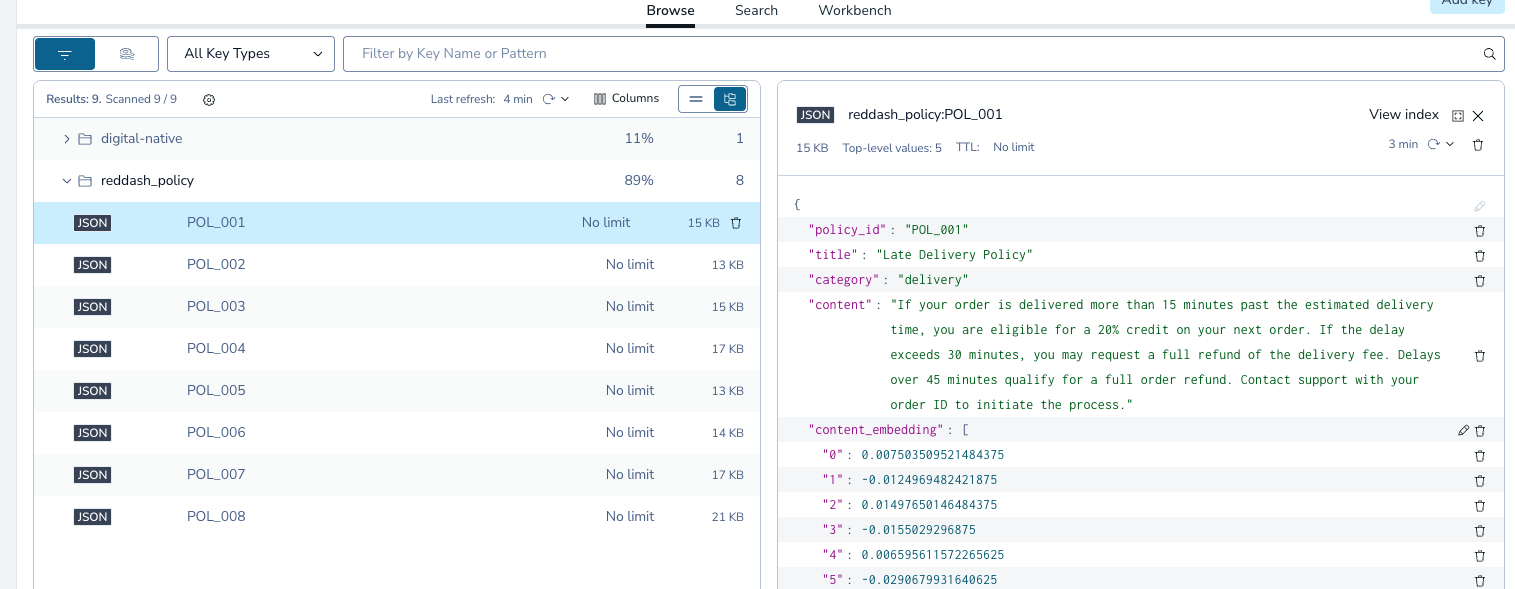
| Field | Type |
|---|---|
policy_id |
text |
title |
text |
category |
text |
content |
text |
content_embedding |
vector |
4. Open your exercise file
Open exercises/digital-native/vector_search.py in your IDE.
5. Connect your agent to vector search
Replace return None with:
return VectorQuery(
    vector=embedding,
    vector_field_name="___",                    # which field stores the vectors?
    return_fields=["___", "___", "___", "___"], # which fields do you want back?
    num_results=3,
)
vector_field_nameis the field with type vectorreturn_fieldsare the fields with type text
Show solution
Verify
Restart the server (Ctrl+C then):
Open localhost:3040.
- Ask: "Why is my order running late?"
- Click
Vector-search-policiesin the right activity panel to see the results